Lekhapal User Manual
Get Started
  • Selling

    • Point of Sale
    • Sales
    • Loyalty
    • Online Store
  • Buying & Books

    • Purchase
    • Accounting
  • Operations

    • Inventory
    • CRM
    • Human Resources
Reports
Administration
  • Sign in
  • Create an account
  • Website
  • English
  • नेपाली
Get Started
  • Selling

    • Point of Sale
    • Sales
    • Loyalty
    • Online Store
  • Buying & Books

    • Purchase
    • Accounting
  • Operations

    • Inventory
    • CRM
    • Human Resources
Reports
Administration
  • Sign in
  • Create an account
  • Website
  • English
  • नेपाली
  • Getting Started

    • Overview
    • Accounting Basics
    • Create an Account
    • Signing In
    • Dashboard
    • Quick Add
  • Point of Sale
  • Sales

    • Overview
    • Quotation
    • Sales Order
    • Sales Invoice
    • Credit Note
    • Customer Payment
    • Allocate Customer Payment
  • Purchase

    • Overview
    • Purchase Order
    • Purchases
    • Expenses
    • Debit Note
    • Supplier Payment
    • Allocate Supplier Payment
  • Accounting

    • Overview
    • Bank Accounts
    • Cheque Register
    • Journal Voucher
    • Chart of Accounts
    • Contra Entry
    • Opening Balance
  • Inventory

    • Overview
    • Products
    • Movements
    • Manufacturing
    • Master Data
  • CRM
  • Loyalty
  • Human Resources

    • Overview
    • Self-Service
    • People & Organisation
    • Time & Attendance
    • Payroll & Compensation
    • HR Settings
  • Online Store
  • Reports

    • Overview
    • POS Reports
    • Sales Reports
    • Purchase Reports
    • Receivable & Payable
    • Party Reports
    • Tax Reports
    • Inventory Reports
    • Accounting Reports
    • Asset Reports
    • System Reports
  • Administration

    • Overview
    • Roles & Permissions
    • Users
    • Settings
    • File Manager
    • My Subscription

File Manager

The File Manager stores, organises and manages the files and documents that belong to the business — one place for the paperwork that would otherwise live on someone's desktop.

Admin → File Manager
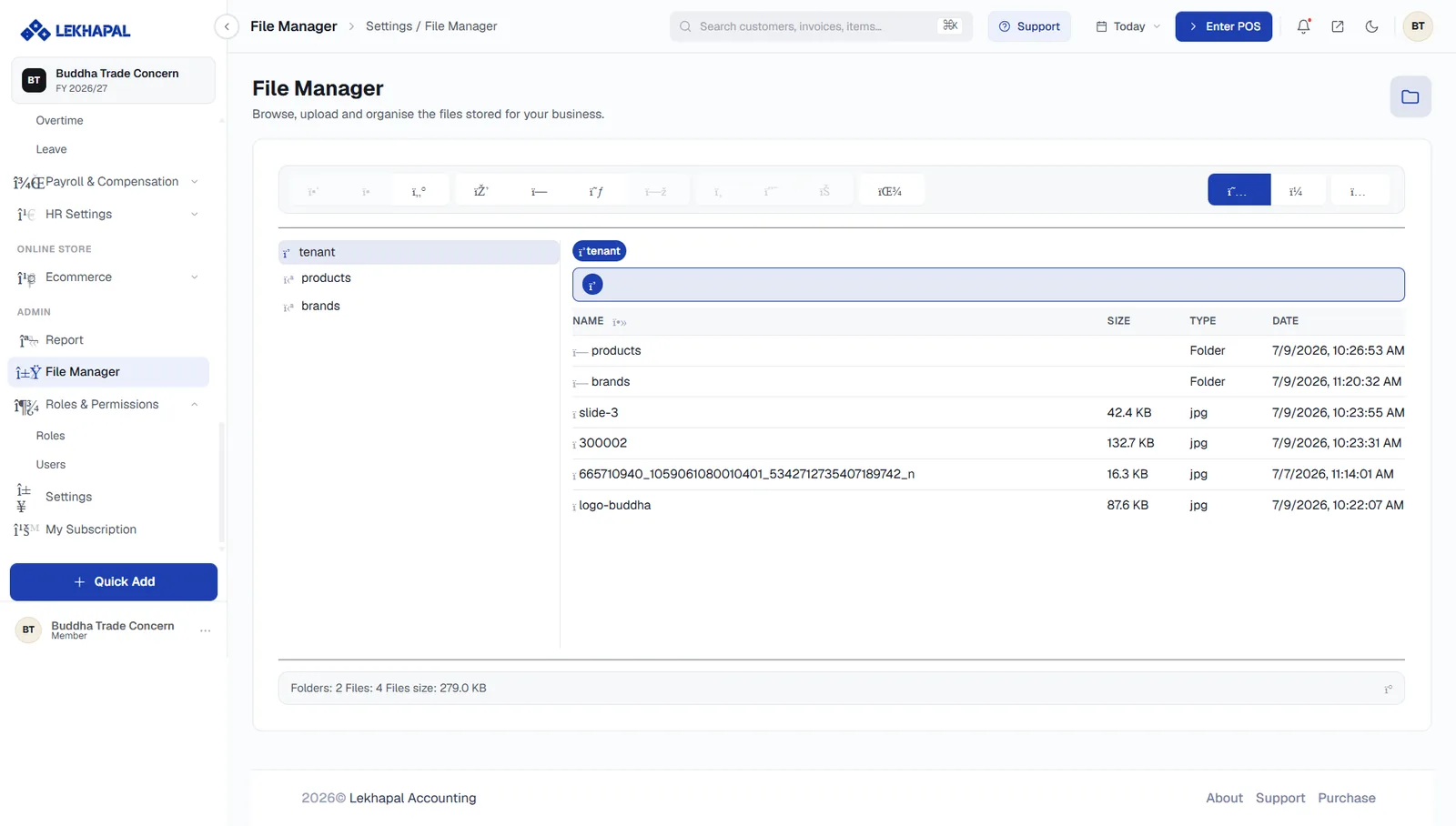
The File Manager.

The screen

A folder tree on the left, the contents of the selected folder on the right, with a breadcrumb above it showing where you are.

Each item lists its Name, Size, Type and Date. The status bar at the foot summarises the current folder — for example Folders: 2 · Files: 4 · Files size: 279.0 KB.

The toolbar across the top holds the file operations — upload, new folder, rename, move, copy, delete, download — and the view switcher on the right toggles between list and grid.

What to keep here

Typical contents:

  • purchase bills,
  • invoices,
  • contracts,
  • employee documents,
  • product and brand images.

Some folders are created and used by Lekhapal itself — products and brands hold the images you upload against products and brands.

Agree a folder structure before you start

A shallow, obvious structure — one folder per document type, per year — stays usable. An ad-hoc one becomes a second desktop within a month.

Next

→ My Subscription

Prev
Settings
Next
My Subscription