Reports
The Report Center turns the transactions recorded across Lekhapal into business information: sales, purchases, stock, taxes, receivables, payables and financial position, all in one place.
Admin → Report
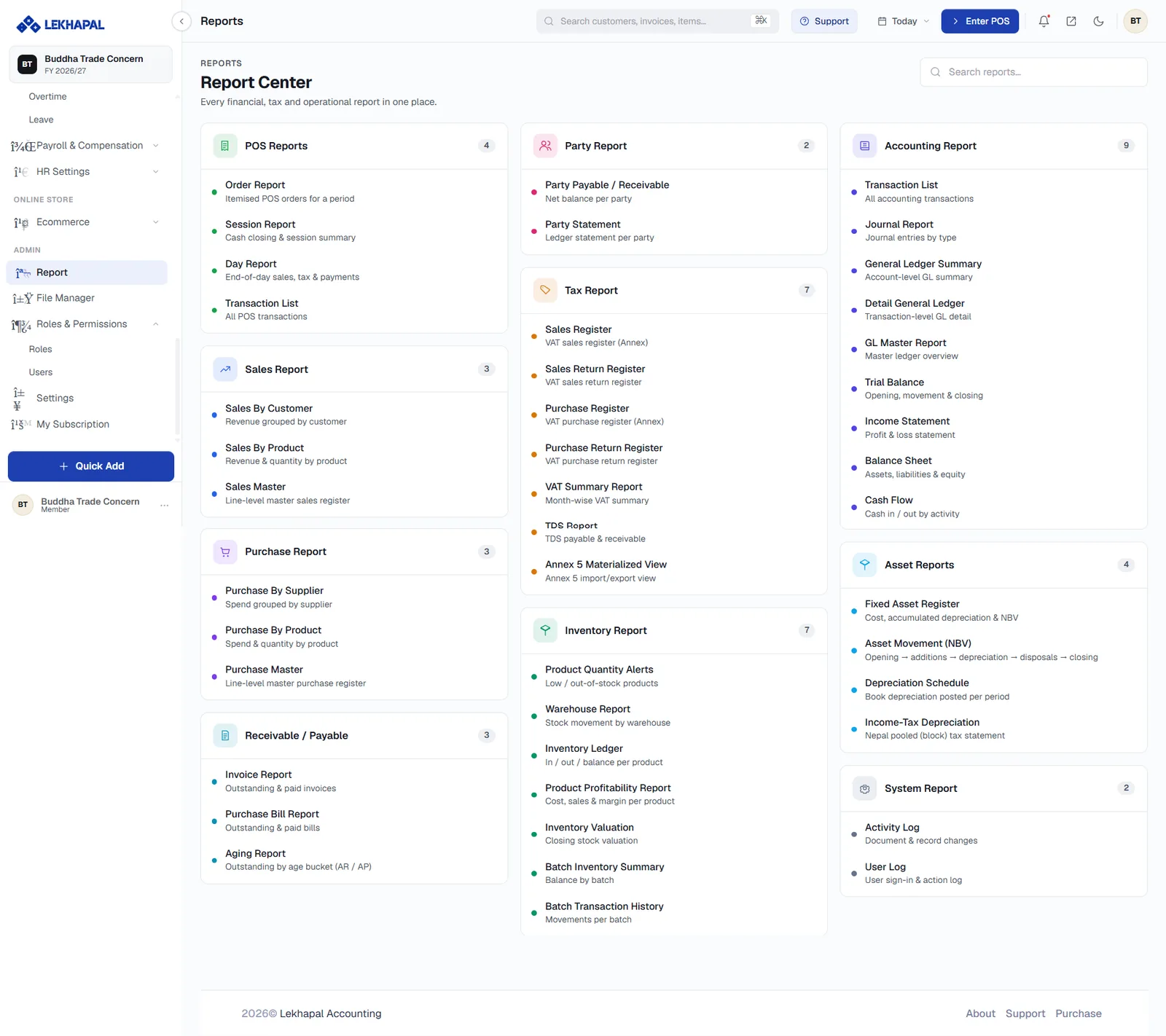
The catalogue
Forty-four reports in ten categories. Each card lists its reports with a one-line description; the number in the corner is how many it contains. The Search reports… box at the top finds a report by name.
| Category | Reports | Page |
|---|---|---|
| POS Reports | 4 | POS Reports |
| Sales Report | 3 | Sales Reports |
| Purchase Report | 3 | Purchase Reports |
| Receivable / Payable | 3 | Receivable & Payable |
| Party Report | 2 | Party Reports |
| Tax Report | 7 | Tax Reports |
| Inventory Report | 7 | Inventory Reports |
| Accounting Report | 9 | Accounting Reports |
| Asset Reports | 4 | Asset Reports |
| System Report | 2 | System Reports |
How every report works
The reports differ in content but share the same controls.
| Control | What it does |
|---|---|
| Period | A date-range picker. Every figure on the page is for this range |
| Expand all / Collapse all | Opens or closes grouped rows on hierarchical reports |
| Downloads a formatted PDF | |
| XLSX | Downloads the data as a spreadsheet |
| ← | Returns to the Report Center |
Hierarchical reports — the Trial Balance, the Balance Sheet, the General Ledger — let you expand a heading to see the accounts beneath it, so you can start at the summary and drill down only where something looks wrong.
Check the period and the fiscal year
Two things scope every report: the Period picker on the report itself, and the fiscal year selected in the top-left corner of the app. A report that looks empty is usually one or the other.
Which report answers which question
| Question | Report |
|---|---|
| Did we make a profit? | Income Statement |
| What is the business worth? | Balance Sheet |
| Do the books balance? | Trial Balance |
| Who owes us, and for how long? | Aging Report |
| What did this customer buy? | Party Statement |
| What sells best? | Sales by Product |
| Which products make money? | Product Profitability |
| What do we need to reorder? | Product Quantity Alerts |
| What is my VAT position? | VAT Summary Report |
| How did the counter do today? | Day Report |
| Who changed this record? | Activity Log |