Lekhapal User Manual
Get Started
  • Selling

    • Point of Sale
    • Sales
    • Loyalty
    • Online Store
  • Buying & Books

    • Purchase
    • Accounting
  • Operations

    • Inventory
    • CRM
    • Human Resources
Reports
Administration
  • Sign in
  • Create an account
  • Website
  • English
  • नेपाली
Get Started
  • Selling

    • Point of Sale
    • Sales
    • Loyalty
    • Online Store
  • Buying & Books

    • Purchase
    • Accounting
  • Operations

    • Inventory
    • CRM
    • Human Resources
Reports
Administration
  • Sign in
  • Create an account
  • Website
  • English
  • नेपाली
  • Getting Started

    • Overview
    • Accounting Basics
    • Create an Account
    • Signing In
    • Dashboard
    • Quick Add
  • Point of Sale
  • Sales

    • Overview
    • Quotation
    • Sales Order
    • Sales Invoice
    • Credit Note
    • Customer Payment
    • Allocate Customer Payment
  • Purchase

    • Overview
    • Purchase Order
    • Purchases
    • Expenses
    • Debit Note
    • Supplier Payment
    • Allocate Supplier Payment
  • Accounting

    • Overview
    • Bank Accounts
    • Cheque Register
    • Journal Voucher
    • Chart of Accounts
    • Contra Entry
    • Opening Balance
  • Inventory

    • Overview
    • Products
    • Movements
    • Manufacturing
    • Master Data
  • CRM
  • Loyalty
  • Human Resources

    • Overview
    • Self-Service
    • People & Organisation
    • Time & Attendance
    • Payroll & Compensation
    • HR Settings
  • Online Store
  • Reports

    • Overview
    • POS Reports
    • Sales Reports
    • Purchase Reports
    • Receivable & Payable
    • Party Reports
    • Tax Reports
    • Inventory Reports
    • Accounting Reports
    • Asset Reports
    • System Reports
  • Administration

    • Overview
    • Roles & Permissions
    • Users
    • Settings
    • File Manager
    • My Subscription

Debit Note

A debit note is issued to a supplier when you return goods, when they have overcharged you, or when the amount payable otherwise needs to come down. It reduces what you owe.

It is the mirror image of a credit note.

When to use one

  • Returning goods to a supplier.
  • The supplier has overcharged.
  • Items arrived damaged or defective.
  • Any post-purchase adjustment.

What it helps you do

  • Record purchase returns.
  • Adjust supplier bills.
  • Correct overbilling errors.
  • Reduce payable amounts.

Create a debit note

Purchases → Debit Note → + Add Debit Note
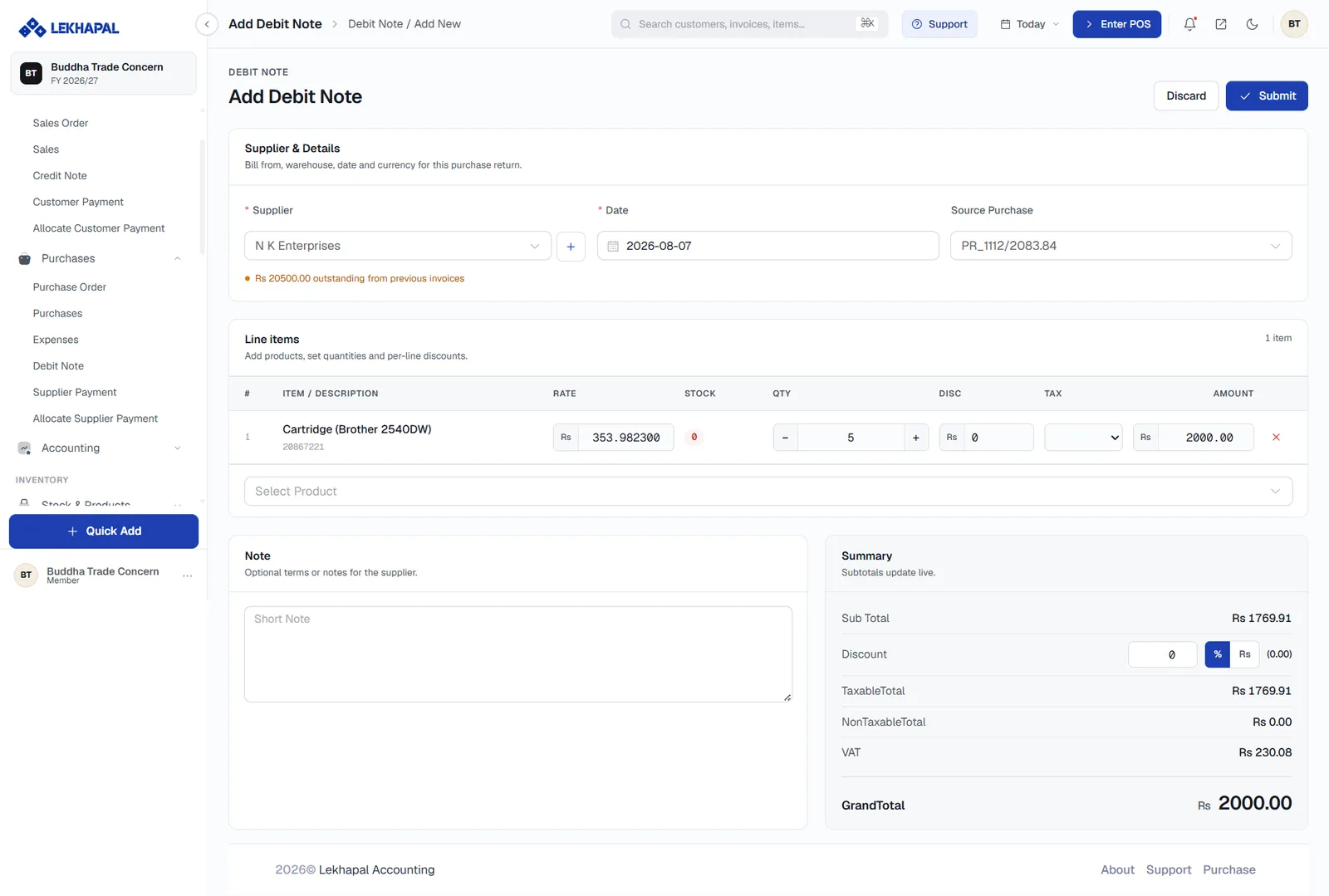
The Add Debit Note form.

  1. Choose the Supplier and the Date.
  2. Set Source Purchase — the bill this debit note is raised against. This is what makes the note reduce the right payable, so fill it in whenever the return relates to a specific bill.
  3. Add the Line items being returned, with quantities and rates. Note that the STOCK figure reflects what you currently hold, so you can confirm the goods are actually there to return.
  4. Add a Note recording why.
  5. Check the Summary and click Submit, then approve it.

What it does to your books

  • Reduces the payable to that supplier.
  • Reverses the recorded cost.
  • Removes the returned goods from stock.
  • Records the VAT adjustment, which appears in the Purchase Return Register.

Next

→ Supplier Payment

Prev
Expenses
Next
Supplier Payment