Payroll & Compensation
Four screens handle what people are paid. Set up the salary structure once, then each period run payroll, with loans and reimbursements feeding into it.
Payroll
Payroll & Compensation → Payroll
Generate, review and disburse statutory-compliant salaries. The period selector in the top-right works in the Nepali calendar — for example Shrawan 2083.
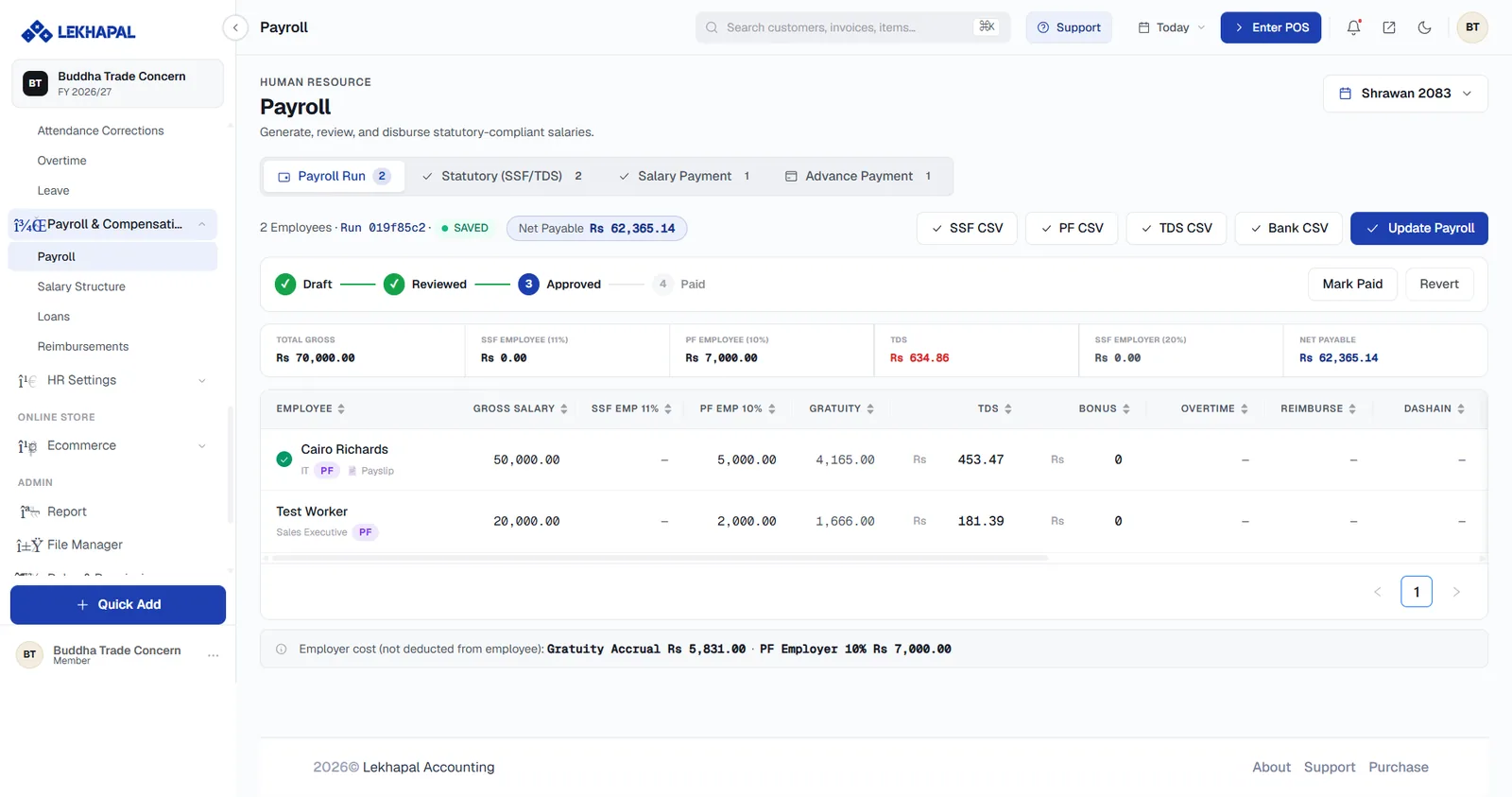
The four stages
Payroll moves through a fixed pipeline, shown as a progress bar:
Draft → Reviewed → Approved → Paid
Mark Paid advances the run to Paid; Revert steps it back.
Tabs
| Tab | Contents |
|---|---|
| Payroll Run | The main salary calculation |
| Statutory (SSF/TDS) | Statutory deductions and contributions |
| Salary Payment | Disbursement of net pay |
| Advance Payment | Advances paid within the period |
Summary figures
| Figure | Meaning |
|---|---|
| Total Gross | Gross salary across all employees |
| SSF Employee (11%) | Employee social security contribution |
| PF Employee (10%) | Employee provident fund |
| TDS | Tax deducted at source |
| SSF Employer (20%) | Employer social security contribution |
| Net Payable | What actually goes out |
The employee table
One row per employee with Gross Salary, SSF Emp 11%, PF Emp 10%, Gratuity, TDS, Bonus, Overtime, Reimburse and Dashain. Every column sorts.
A note at the foot separates employer cost from employee deductions — for example Gratuity Accrual Rs 5,831.00 · PF Employer 10% Rs 7,000.00 — because those are costs to the business, not deductions from the employee.
Exports
Four one-click exports produce the files each institution expects: SSF CSV, PF CSV, TDS CSV and Bank CSV. The bank file is what you upload to disburse salaries.
Update Payroll recalculates the run after a change.
Finish attendance before you run payroll
Overtime, leave and attendance corrections all feed the calculation. Approve everything outstanding in Time & Attendance first, or you will be reverting the run.
Salary Structure
Payroll & Compensation → Salary Structure
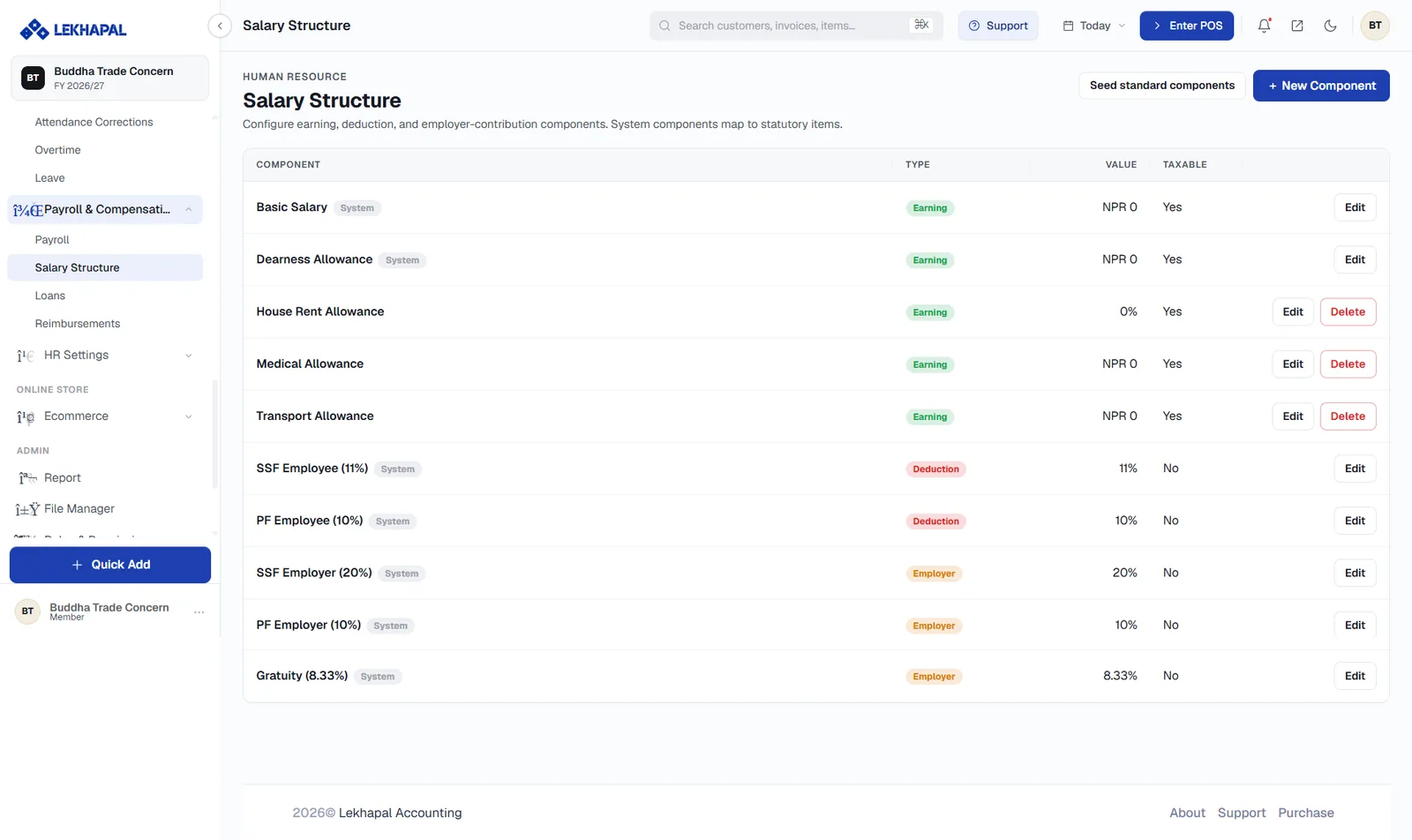
Configure the earning, deduction and employer-contribution components that payroll is built from. Components marked System map to statutory items and cannot be deleted — only edited.
| Component | Type | Typical value |
|---|---|---|
| Basic Salary | Earning | Per employee |
| Dearness Allowance | Earning | Per employee |
| House Rent Allowance | Earning | Percentage |
| Medical Allowance | Earning | Amount |
| Transport Allowance | Earning | Amount |
| SSF Employee (11%) | Deduction | 11% |
| PF Employee (10%) | Deduction | 10% |
| SSF Employer (20%) | Employer | 20% |
| PF Employer (10%) | Employer | 10% |
| Gratuity (8.33%) | Employer | 8.33% |
The Taxable column controls whether a component enters the TDS calculation.
Seed standard components creates the standard Nepali set in one click — the fastest way to start. + New Component adds your own.
Loans
Payroll & Compensation → Loans
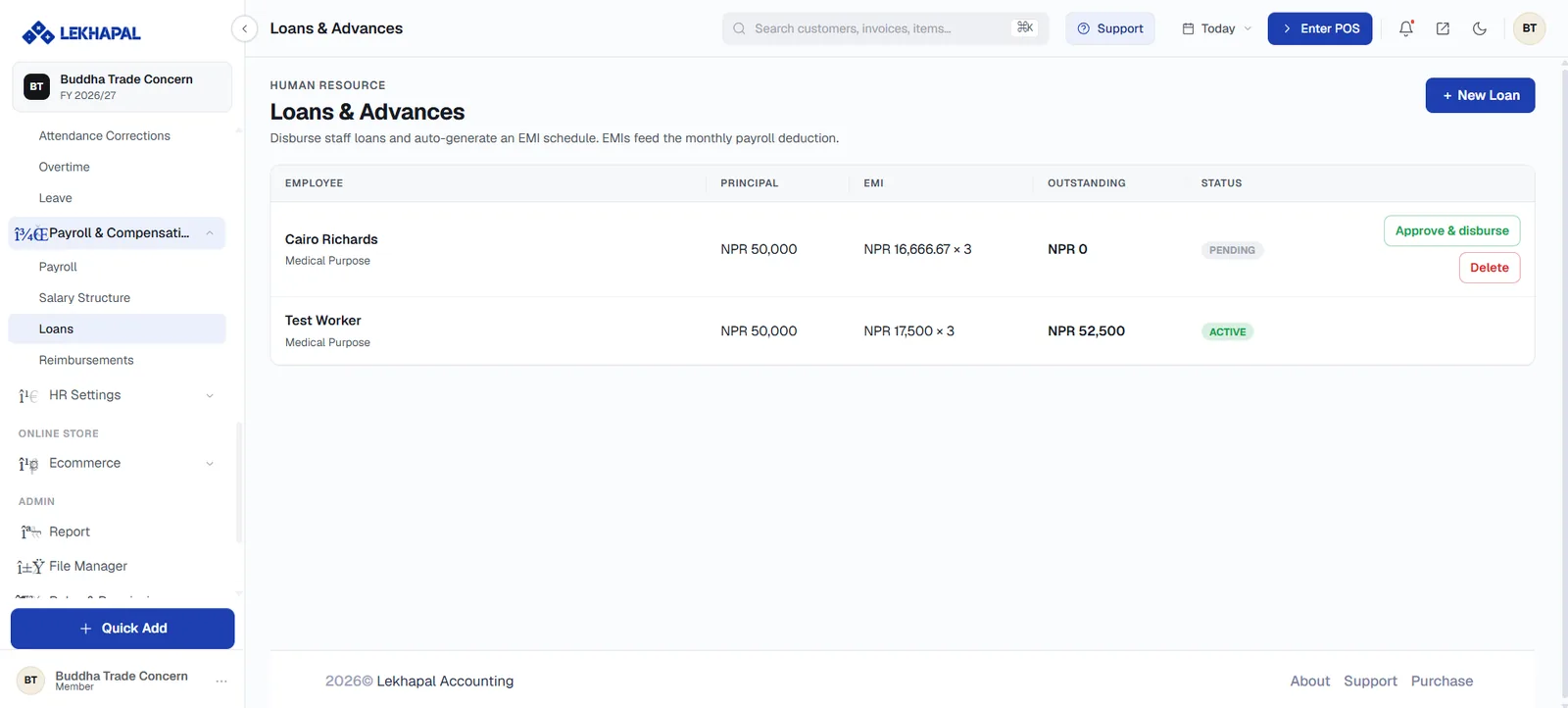
Disburse staff loans and auto-generate an EMI schedule. The EMIs feed the monthly payroll deduction automatically.
Each row shows the employee, the loan purpose, the Principal, the EMI (for example NPR 17,500 × 3), the Outstanding balance and the status. Pending loans carry Approve & disburse and Delete.
Create a loan
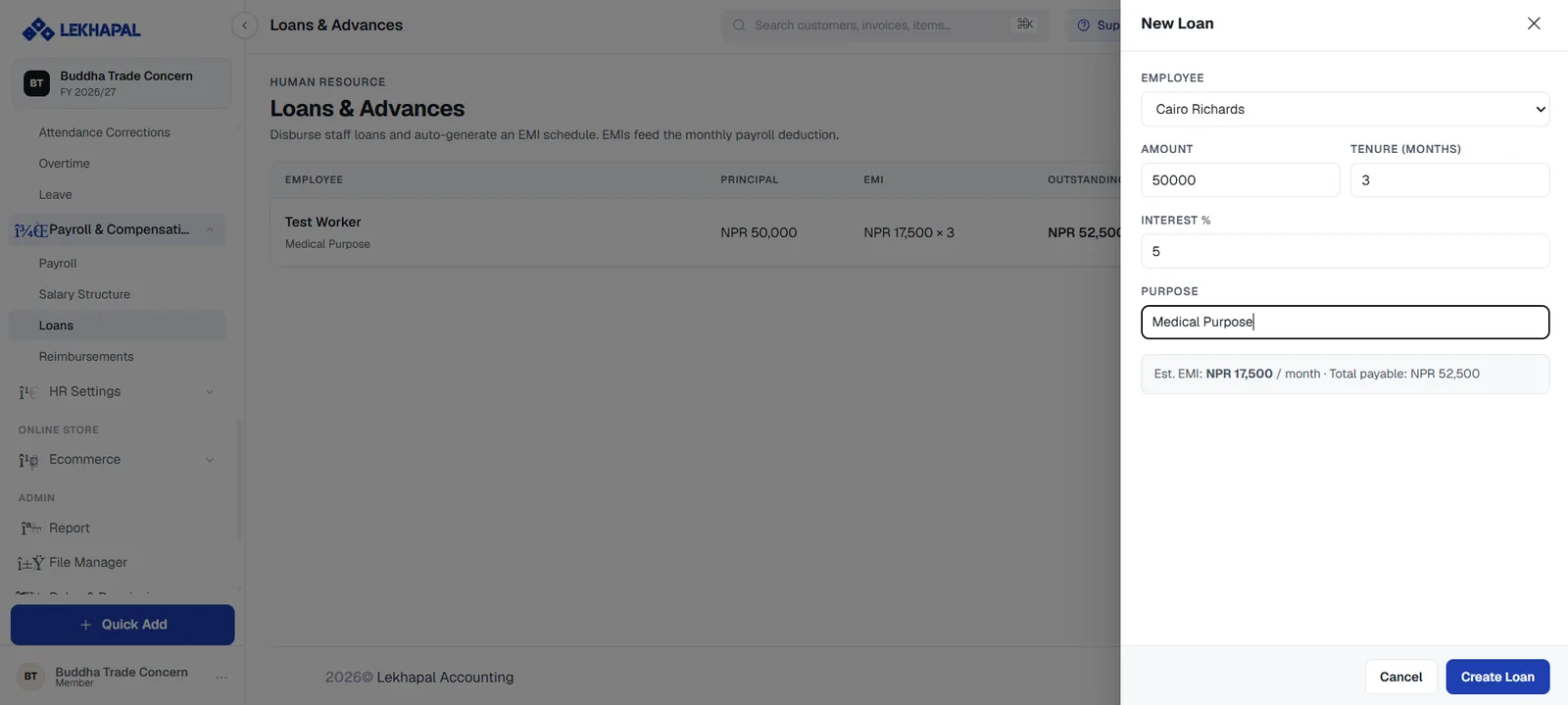
Click + New Loan and set the Employee, Amount, Tenure (months), Interest % and Purpose. Lekhapal shows the estimated EMI and total payable before you commit — for example Est. EMI: NPR 17,500 / month · Total payable: NPR 52,500.
Click Create Loan, then Approve & disburse to release the money and start the deduction schedule.
Reimbursements
Payroll & Compensation → Reimbursements
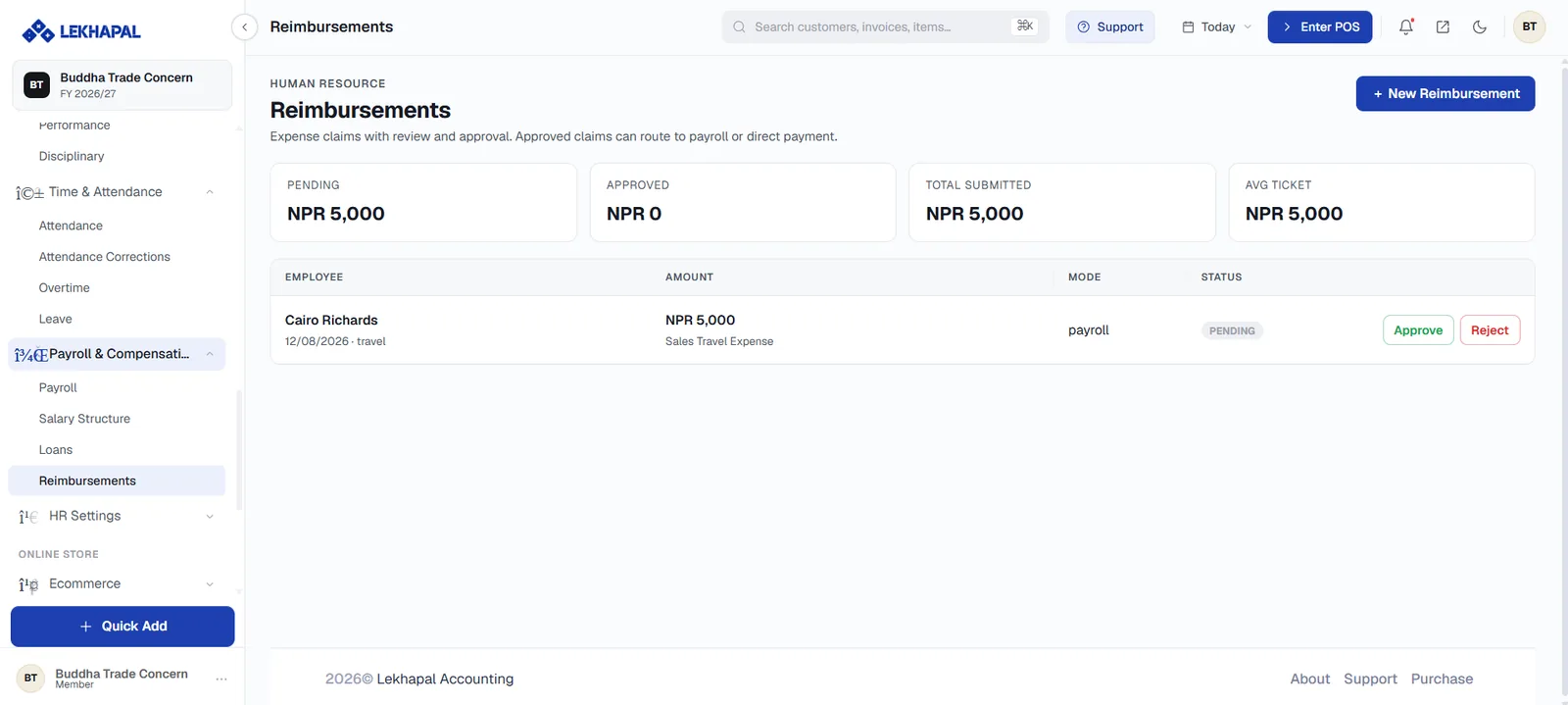
Expense claims with review and approval. Approved claims can route to payroll or be paid directly — the Mode column shows which.
Four summary tiles head the page: Pending, Approved, Total Submitted and Avg Ticket.
Each claim shows the employee, the date and category, the Amount, the expense description, the Mode and its status, with Approve and Reject actions. + New Reimbursement raises a claim.
Claims routed to payroll appear in the REIMBURSE column of the payroll run.