Lekhapal User Manual
Get Started
  • Selling

    • Point of Sale
    • Sales
    • Loyalty
    • Online Store
  • Buying & Books

    • Purchase
    • Accounting
  • Operations

    • Inventory
    • CRM
    • Human Resources
Reports
Administration
  • Sign in
  • Create an account
  • Website
  • English
  • नेपाली
Get Started
  • Selling

    • Point of Sale
    • Sales
    • Loyalty
    • Online Store
  • Buying & Books

    • Purchase
    • Accounting
  • Operations

    • Inventory
    • CRM
    • Human Resources
Reports
Administration
  • Sign in
  • Create an account
  • Website
  • English
  • नेपाली
  • Getting Started

    • Overview
    • Accounting Basics
    • Create an Account
    • Signing In
    • Dashboard
    • Quick Add
  • Point of Sale
  • Sales

    • Overview
    • Quotation
    • Sales Order
    • Sales Invoice
    • Credit Note
    • Customer Payment
    • Allocate Customer Payment
  • Purchase

    • Overview
    • Purchase Order
    • Purchases
    • Expenses
    • Debit Note
    • Supplier Payment
    • Allocate Supplier Payment
  • Accounting

    • Overview
    • Bank Accounts
    • Cheque Register
    • Journal Voucher
    • Chart of Accounts
    • Contra Entry
    • Opening Balance
  • Inventory

    • Overview
    • Products
    • Movements
    • Manufacturing
    • Master Data
  • CRM
  • Loyalty
  • Human Resources

    • Overview
    • Self-Service
    • People & Organisation
    • Time & Attendance
    • Payroll & Compensation
    • HR Settings
  • Online Store
  • Reports

    • Overview
    • POS Reports
    • Sales Reports
    • Purchase Reports
    • Receivable & Payable
    • Party Reports
    • Tax Reports
    • Inventory Reports
    • Accounting Reports
    • Asset Reports
    • System Reports
  • Administration

    • Overview
    • Roles & Permissions
    • Users
    • Settings
    • File Manager
    • My Subscription

Contra Entry

A contra entry records money moving between the business's own cash and bank accounts. No customer or supplier is involved, and there is no effect on profit or loss — the money simply changes hands internally.

What it helps you do

  • Record cash deposited into the bank.
  • Record cash withdrawn from the bank.
  • Track internal fund transfers.
  • Keep cash and bank balances accurate.

Create a contra entry

Accounting → Contra Entry → + New
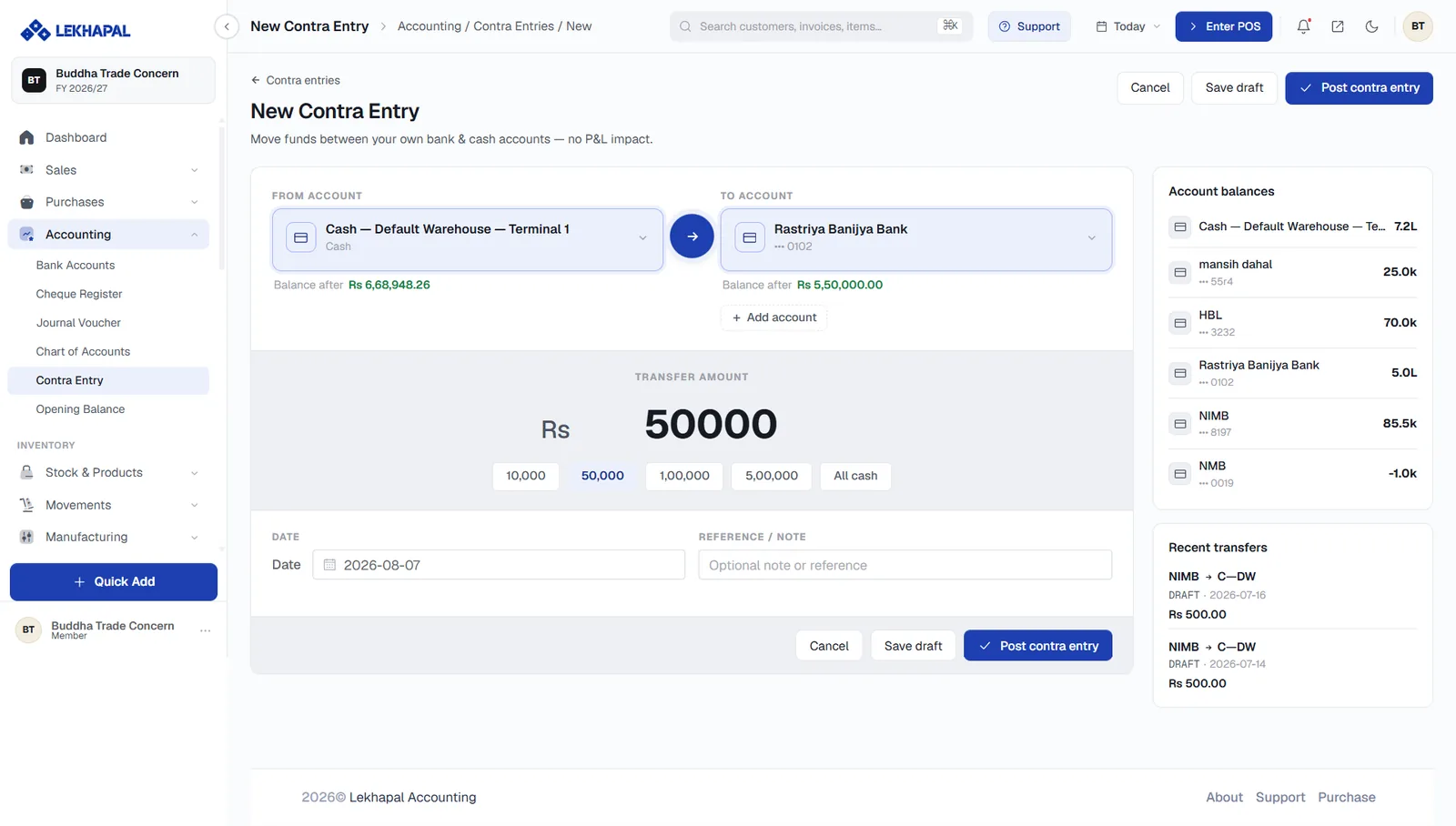
The New Contra Entry screen.

  1. Pick the From Account — where the money leaves. The Balance after figure under the box updates live, so you can see whether the account can stand the transfer.
  2. Pick the To Account — where the money lands, with its own Balance after figure. + Add account creates a new account without leaving the screen.
  3. Enter the Transfer Amount. Quick-amount chips — 10,000, 50,000, 1,00,000, 5,00,000 and All cash — save typing for common amounts.
  4. Set the Date.
  5. Add a Reference / Note if the transfer needs explaining.
  6. Click Post contra entry, or Save draft to finish it later.

The panel on the right shows Account balances across every account and Recent transfers, so you can confirm you are not duplicating a transfer someone else already made.

No profit and loss impact

The screen says so explicitly: Move funds between your own bank & cash accounts — no P&L impact. If money is leaving the business rather than moving within it, you want a supplier payment or an expense, not a contra entry.

Examples

Cash deposited into the bank

AccountEffect
Cash− Rs. 10,000
Bank+ Rs. 10,000

Cash withdrawn from the bank

AccountEffect
Bank− Rs. 5,000
Cash+ Rs. 5,000

In both cases the total cash position is unchanged — only its location moves.

Next

→ Opening Balance

Prev
Chart of Accounts
Next
Opening Balance