Lekhapal User Manual
Get Started
  • Selling

    • Point of Sale
    • Sales
    • Loyalty
    • Online Store
  • Buying & Books

    • Purchase
    • Accounting
  • Operations

    • Inventory
    • CRM
    • Human Resources
Reports
Administration
  • Sign in
  • Create an account
  • Website
  • English
  • नेपाली
Get Started
  • Selling

    • Point of Sale
    • Sales
    • Loyalty
    • Online Store
  • Buying & Books

    • Purchase
    • Accounting
  • Operations

    • Inventory
    • CRM
    • Human Resources
Reports
Administration
  • Sign in
  • Create an account
  • Website
  • English
  • नेपाली
  • Getting Started

    • Overview
    • Accounting Basics
    • Create an Account
    • Signing In
    • Dashboard
    • Quick Add
  • Point of Sale
  • Sales

    • Overview
    • Quotation
    • Sales Order
    • Sales Invoice
    • Credit Note
    • Customer Payment
    • Allocate Customer Payment
  • Purchase

    • Overview
    • Purchase Order
    • Purchases
    • Expenses
    • Debit Note
    • Supplier Payment
    • Allocate Supplier Payment
  • Accounting

    • Overview
    • Bank Accounts
    • Cheque Register
    • Journal Voucher
    • Chart of Accounts
    • Contra Entry
    • Opening Balance
  • Inventory

    • Overview
    • Products
    • Movements
    • Manufacturing
    • Master Data
  • CRM
  • Loyalty
  • Human Resources

    • Overview
    • Self-Service
    • People & Organisation
    • Time & Attendance
    • Payroll & Compensation
    • HR Settings
  • Online Store
  • Reports

    • Overview
    • POS Reports
    • Sales Reports
    • Purchase Reports
    • Receivable & Payable
    • Party Reports
    • Tax Reports
    • Inventory Reports
    • Accounting Reports
    • Asset Reports
    • System Reports
  • Administration

    • Overview
    • Roles & Permissions
    • Users
    • Settings
    • File Manager
    • My Subscription

Supplier Payment

Supplier Payment records money paid to a supplier for purchases or bills. It reduces what you owe and reduces the balance of the account the money came from.

What it helps you do

  • Record payments made to suppliers.
  • Reduce outstanding payable amounts.
  • Keep supplier balances accurate.
  • Track payment history.

Record a payment

Purchases → Supplier Payment → + Add Supplier Payment
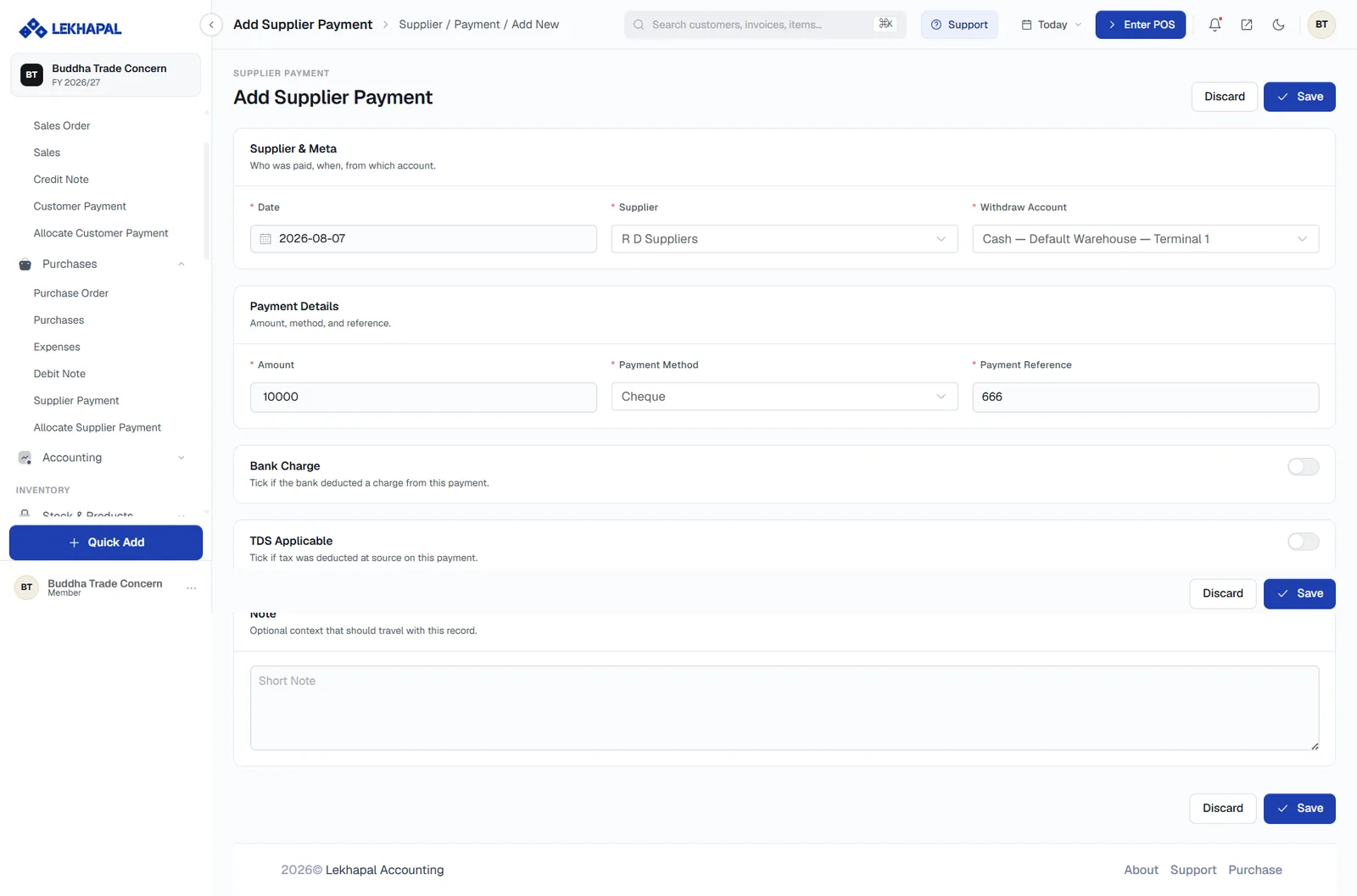
The Add Supplier Payment form.

Supplier & Meta

FieldNotes
DateWhen the payment was made
SupplierWho was paid
Withdraw AccountWhich bank or cash account the money came from

Payment Details

FieldNotes
AmountHow much was paid
Payment MethodCash, cheque, bank transfer, online
Payment ReferenceThe cheque number or transaction reference

Paying by cheque

When the method is Cheque, also record the cheque in the Cheque Register so you can track it through to clearing.

Bank Charge and TDS Applicable

  • Bank Charge — turn on if the bank deducted a charge from the payment.
  • TDS Applicable — turn on if you deducted tax at source. The withheld amount appears in the TDS Report.

Note

Optional context that travels with the record.

Click Save.

After saving

The payment reduces the supplier's balance immediately. To tie it to specific bills, use Allocate Supplier Payment. Allocated payments show up in the Payments section of each purchase.

Example

A business has a purchase bill of Rs. 15,000.

  • It pays Rs. 10,000 now, recorded as a supplier payment.
  • Rs. 5,000 remains pending.
  • When the balance is paid, a second supplier payment is recorded.

Next

→ Allocate Supplier Payment

Prev
Debit Note
Next
Allocate Supplier Payment