Lekhapal User Manual
Get Started
  • Selling

    • Point of Sale
    • Sales
    • Loyalty
    • Online Store
  • Buying & Books

    • Purchase
    • Accounting
  • Operations

    • Inventory
    • CRM
    • Human Resources
Reports
Administration
  • Sign in
  • Create an account
  • Website
  • English
  • नेपाली
Get Started
  • Selling

    • Point of Sale
    • Sales
    • Loyalty
    • Online Store
  • Buying & Books

    • Purchase
    • Accounting
  • Operations

    • Inventory
    • CRM
    • Human Resources
Reports
Administration
  • Sign in
  • Create an account
  • Website
  • English
  • नेपाली
  • Getting Started

    • Overview
    • Accounting Basics
    • Create an Account
    • Signing In
    • Dashboard
    • Quick Add
  • Point of Sale
  • Sales

    • Overview
    • Quotation
    • Sales Order
    • Sales Invoice
    • Credit Note
    • Customer Payment
    • Allocate Customer Payment
  • Purchase

    • Overview
    • Purchase Order
    • Purchases
    • Expenses
    • Debit Note
    • Supplier Payment
    • Allocate Supplier Payment
  • Accounting

    • Overview
    • Bank Accounts
    • Cheque Register
    • Journal Voucher
    • Chart of Accounts
    • Contra Entry
    • Opening Balance
  • Inventory

    • Overview
    • Products
    • Movements
    • Manufacturing
    • Master Data
  • CRM
  • Loyalty
  • Human Resources

    • Overview
    • Self-Service
    • People & Organisation
    • Time & Attendance
    • Payroll & Compensation
    • HR Settings
  • Online Store
  • Reports

    • Overview
    • POS Reports
    • Sales Reports
    • Purchase Reports
    • Receivable & Payable
    • Party Reports
    • Tax Reports
    • Inventory Reports
    • Accounting Reports
    • Asset Reports
    • System Reports
  • Administration

    • Overview
    • Roles & Permissions
    • Users
    • Settings
    • File Manager
    • My Subscription

My Subscription

My Subscription shows your current plan, its billing details and the features it enables. It is the answer to "why can I not see that module?"

Admin → My Subscription
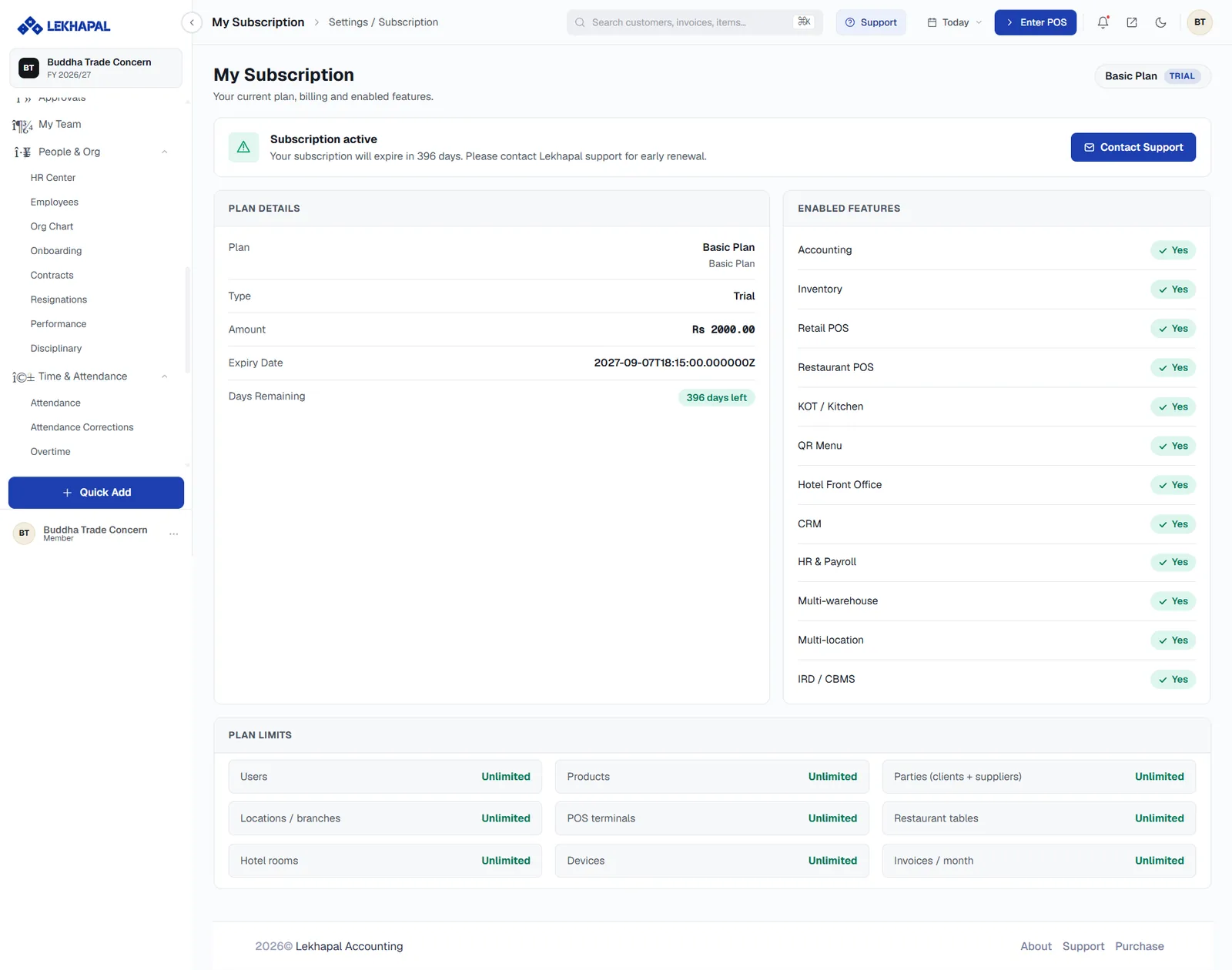
My Subscription.

What it tells you

Status banner

A banner at the top states whether the subscription is active and how long is left — for example Your subscription will expire in 396 days. Contact Support starts a renewal or an upgrade.

Plan details

FieldMeaning
PlanThe plan name
TypeTrial or paid
AmountWhat it costs
Expiry DateWhen it ends
Days RemainingThe countdown, as a badge

Enabled features

A checklist of everything the plan includes, each with a Yes or No:

Accounting · Inventory · Retail POS · Restaurant POS · KOT / Kitchen · QR Menu · Hotel Front Office · CRM · HR & Payroll · Multi-warehouse · Multi-location · IRD / CBMS.

This list is the definitive answer to what your account can do. If a module in this manual is missing from your menu, check here first, then check your role.

Plan limits

The ceilings that apply to your plan: users, products, parties, locations and branches, POS terminals, restaurant tables, hotel rooms, devices, and invoices per month. Each shows either a number or Unlimited.

Renewing or upgrading

Use Contact Support on this page. Renewal before expiry avoids any interruption.

Note the expiry date

Watch the Days Remaining badge. Renewing before expiry is straightforward; a lapsed subscription interrupts access for everyone in the business.

You have reached the end

That is the whole manual. Useful places to go back to:

  • The sales cycle — how documents connect
  • Report Center — the full report catalogue
  • Accounting Basics — the vocabulary

Or use the search box at the top of the page.

Prev
File Manager