Lekhapal User Manual
Get Started
  • Selling

    • Point of Sale
    • Sales
    • Loyalty
    • Online Store
  • Buying & Books

    • Purchase
    • Accounting
  • Operations

    • Inventory
    • CRM
    • Human Resources
Reports
Administration
  • Sign in
  • Create an account
  • Website
  • English
  • नेपाली
Get Started
  • Selling

    • Point of Sale
    • Sales
    • Loyalty
    • Online Store
  • Buying & Books

    • Purchase
    • Accounting
  • Operations

    • Inventory
    • CRM
    • Human Resources
Reports
Administration
  • Sign in
  • Create an account
  • Website
  • English
  • नेपाली
  • Getting Started

    • Overview
    • Accounting Basics
    • Create an Account
    • Signing In
    • Dashboard
    • Quick Add
  • Point of Sale
  • Sales

    • Overview
    • Quotation
    • Sales Order
    • Sales Invoice
    • Credit Note
    • Customer Payment
    • Allocate Customer Payment
  • Purchase

    • Overview
    • Purchase Order
    • Purchases
    • Expenses
    • Debit Note
    • Supplier Payment
    • Allocate Supplier Payment
  • Accounting

    • Overview
    • Bank Accounts
    • Cheque Register
    • Journal Voucher
    • Chart of Accounts
    • Contra Entry
    • Opening Balance
  • Inventory

    • Overview
    • Products
    • Movements
    • Manufacturing
    • Master Data
  • CRM
  • Loyalty
  • Human Resources

    • Overview
    • Self-Service
    • People & Organisation
    • Time & Attendance
    • Payroll & Compensation
    • HR Settings
  • Online Store
  • Reports

    • Overview
    • POS Reports
    • Sales Reports
    • Purchase Reports
    • Receivable & Payable
    • Party Reports
    • Tax Reports
    • Inventory Reports
    • Accounting Reports
    • Asset Reports
    • System Reports
  • Administration

    • Overview
    • Roles & Permissions
    • Users
    • Settings
    • File Manager
    • My Subscription

Purchase Reports

Three reports covering what the business buys. They mirror the sales reports exactly.

ReportIn one line
Purchase by SupplierSpend grouped by supplier
Purchase by ProductSpend and quantity by product
Purchase MasterLine-level master purchase register

Purchase by Supplier

Purchases grouped by supplier, so you can compare spend across your suppliers.
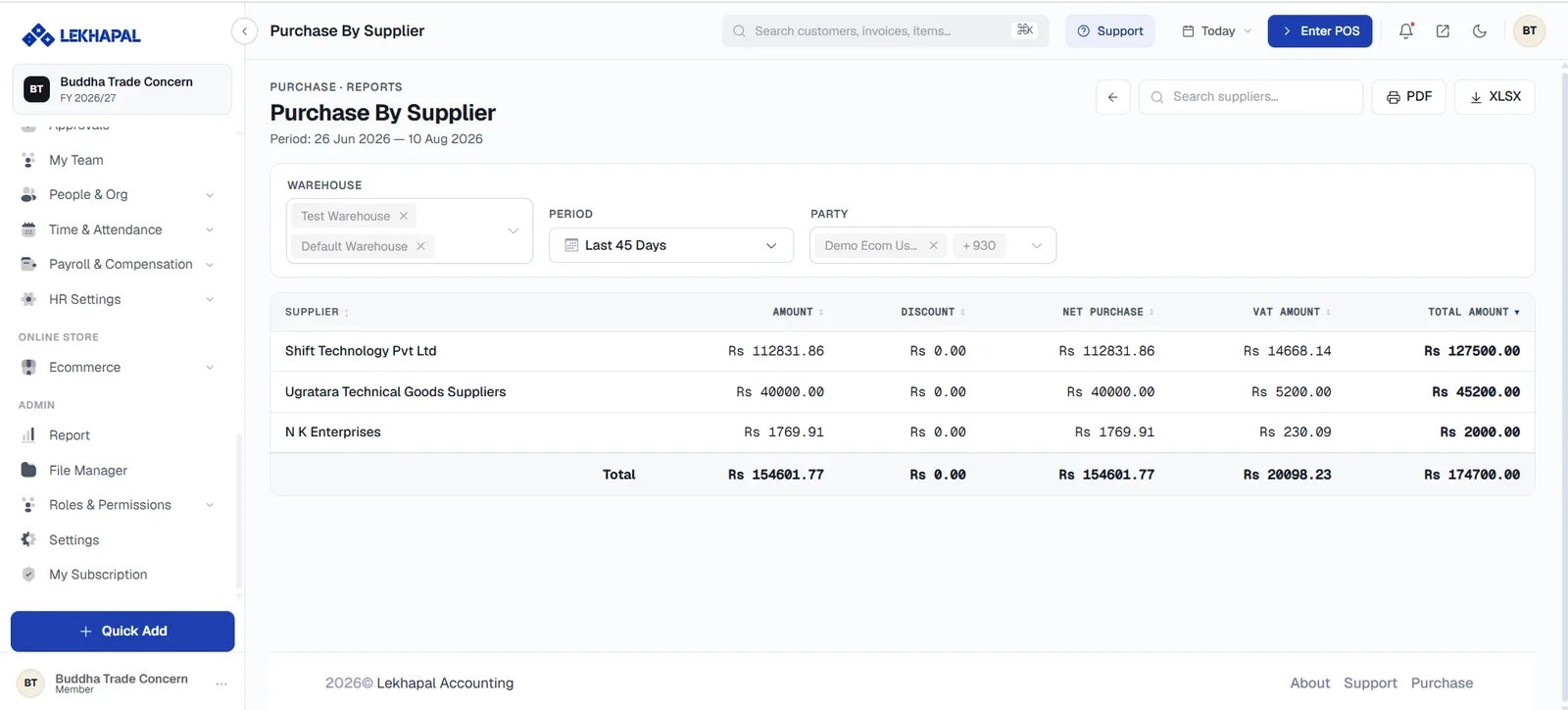
Purchase by Supplier.

Example. A business buys from:

SupplierSpend
Supplier ARs. 500,000
Supplier BRs. 300,000

Useful before a price negotiation: it is much easier to ask for better terms when you can state exactly what you spend.

Purchase by Product

Purchasing broken down by product.
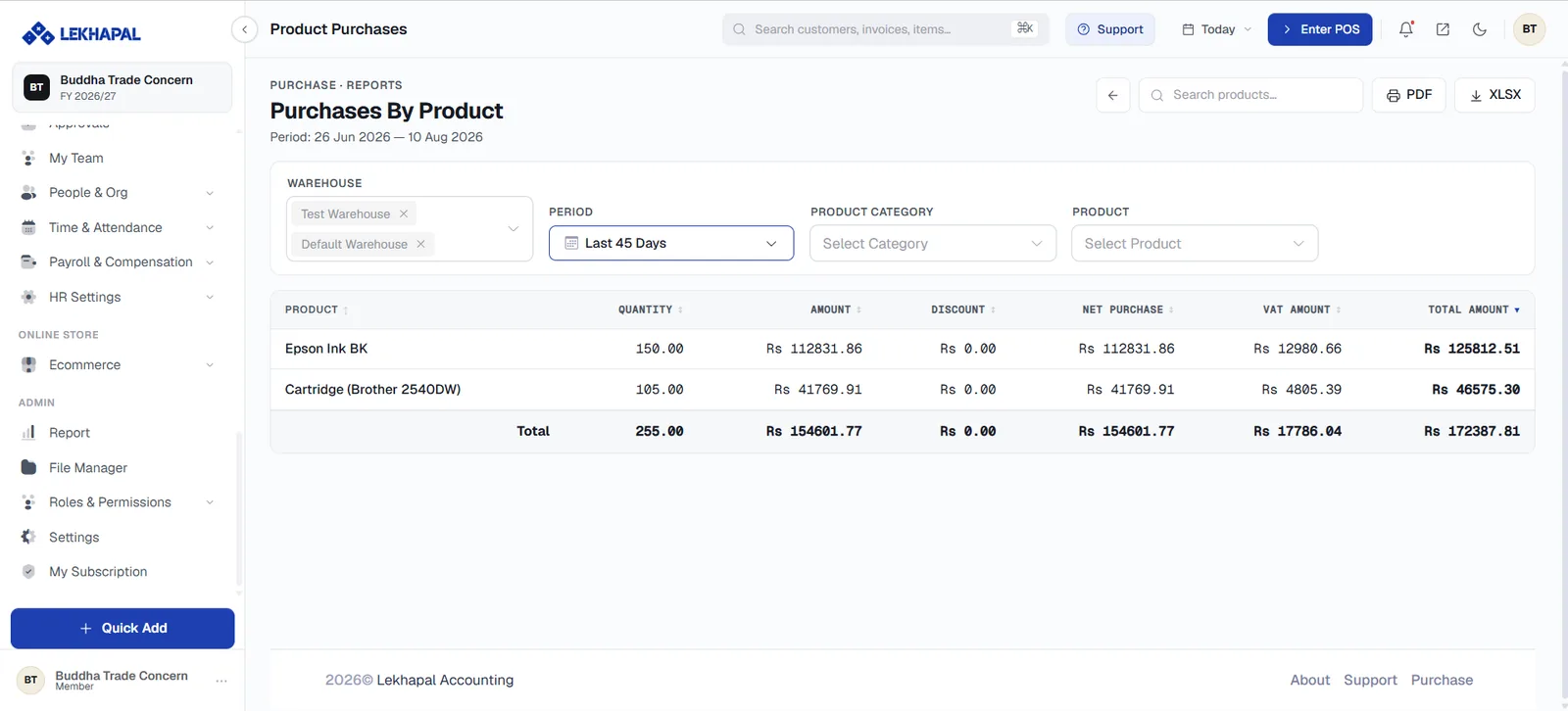
Purchase by Product.

What it gives you

  • Purchase expenditure per product.
  • Quantity purchased.

Example. A retailer can check how many units of a product were bought and how much was spent on it — worth comparing against Sales by Product to spot items you are buying faster than you sell.

Purchase Master

A detailed, line-level purchase register: every purchase line on every bill.
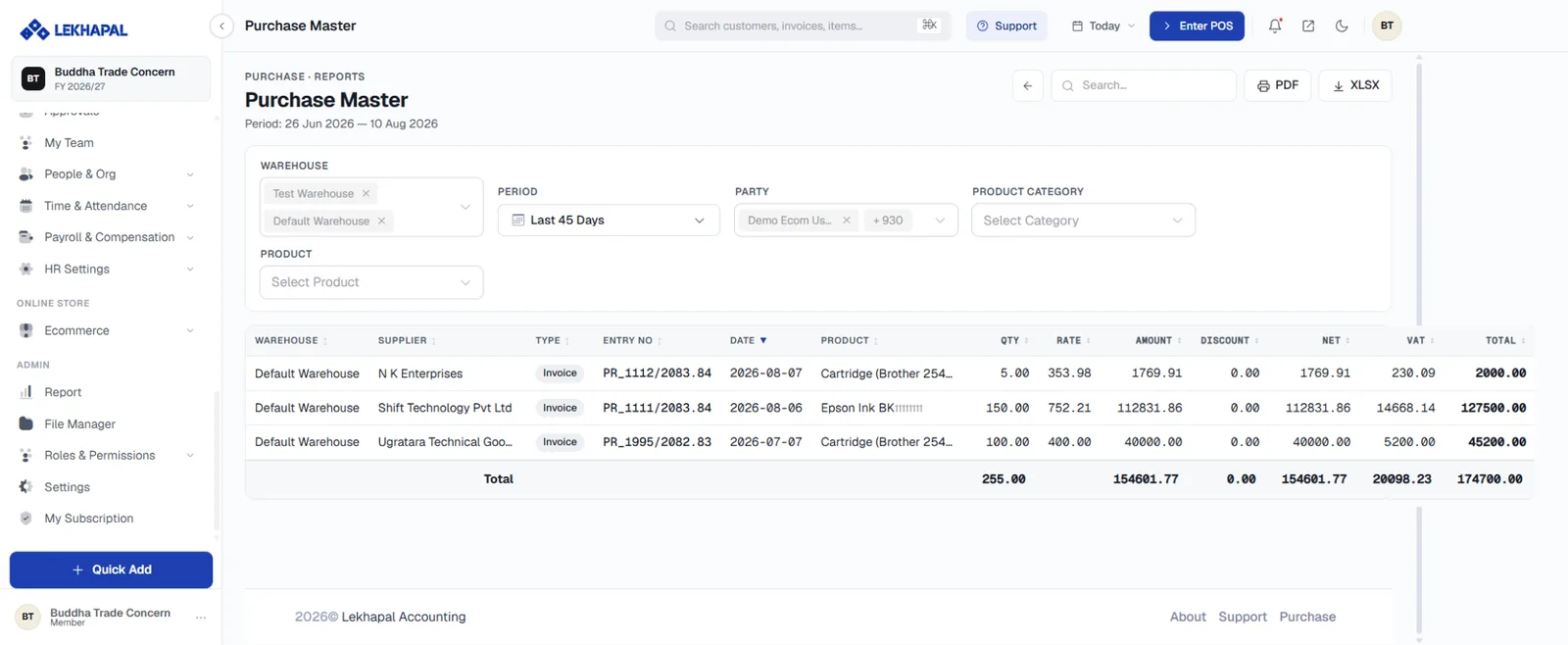
The Purchase Master.

Use it for reconciliation, investigation and export.

Next

→ Receivable & Payable

Prev
Sales Reports
Next
Receivable & Payable