Loyalty
The Loyalty module rewards repeat customers with points they can spend against future purchases. It has two screens: Loyalty Members and Loyalty Program.
Loyalty Members
Loyalty → Loyalty Members
The member list tracks your loyal customers and what they have accumulated.
Use it to:
- see who your repeat customers are,
- check each member's reward points balance,
- review earning and redemption history.
Members are parties, so a customer only earns points when the sale is booked to their name. At the point of sale that means selecting the customer rather than leaving the sale on walk-in-customer.
Loyalty Program
Loyalty → Loyalty Program
This is where you set the rules. The whole program is one screen, with an Off / Active toggle in the top-right.
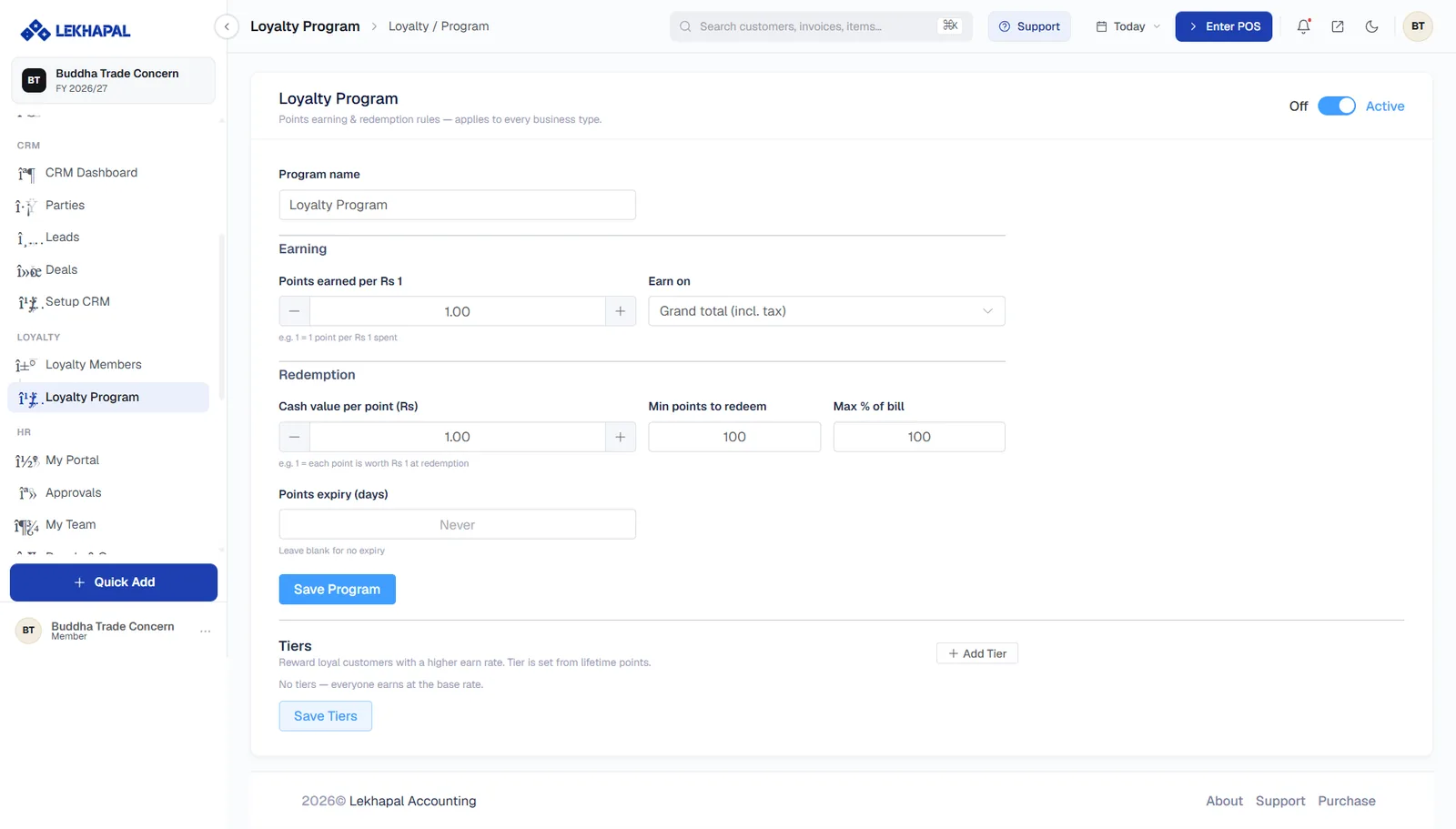
Program name
What the scheme is called.
Earning
| Setting | Meaning |
|---|---|
| Points earned per Rs 1 | The earn rate. 1 means one point per rupee spent |
| Earn on | Which figure points are calculated from — for example Grand total (incl. tax) |
Redemption
| Setting | Meaning |
|---|---|
| Cash value per point (Rs) | What a point is worth at redemption. 1 means each point is worth Rs. 1 |
| Min points to redeem | The smallest balance a customer can spend |
| Max % of bill | The largest share of a bill that can be paid with points |
| Points expiry (days) | How long points last. Leave blank for no expiry |
Click Save Program.
Earn rate and cash value together set the cost
Earning 1 point per rupee and valuing each point at Rs. 1 is a 100% discount scheme. Set the two figures together and check the arithmetic: an earn rate of 1 point per Rs. 100 with a cash value of Rs. 1 per point is a 1% reward.
Tiers
Tiers reward your best customers with a higher earn rate. A customer's tier is set from their lifetime points.
Click + Add Tier to create one, then Save Tiers. With no tiers defined, everyone earns at the base rate.
Example
A scheme where customers spend Rs. 1,000 to earn 10 points:
- Points earned per Rs 1 = 0.01
- Cash value per point = Rs. 1
- Min points to redeem = 100
A customer who spends Rs. 10,000 earns 100 points, worth Rs. 100 against a future purchase.