Chart of Accounts
The chart of accounts (COA) is the structured list of every account used to record financial transactions. It is the skeleton of your books: every transaction Lekhapal records is filed against one of these accounts, and every financial report is built by summing them.
What it helps you do
- Organise all financial transactions properly.
- Classify income, expenses, assets and liabilities.
- Keep accurate accounting records.
- Generate correct financial reports.
The screen
Accounting → Chart of Accounts
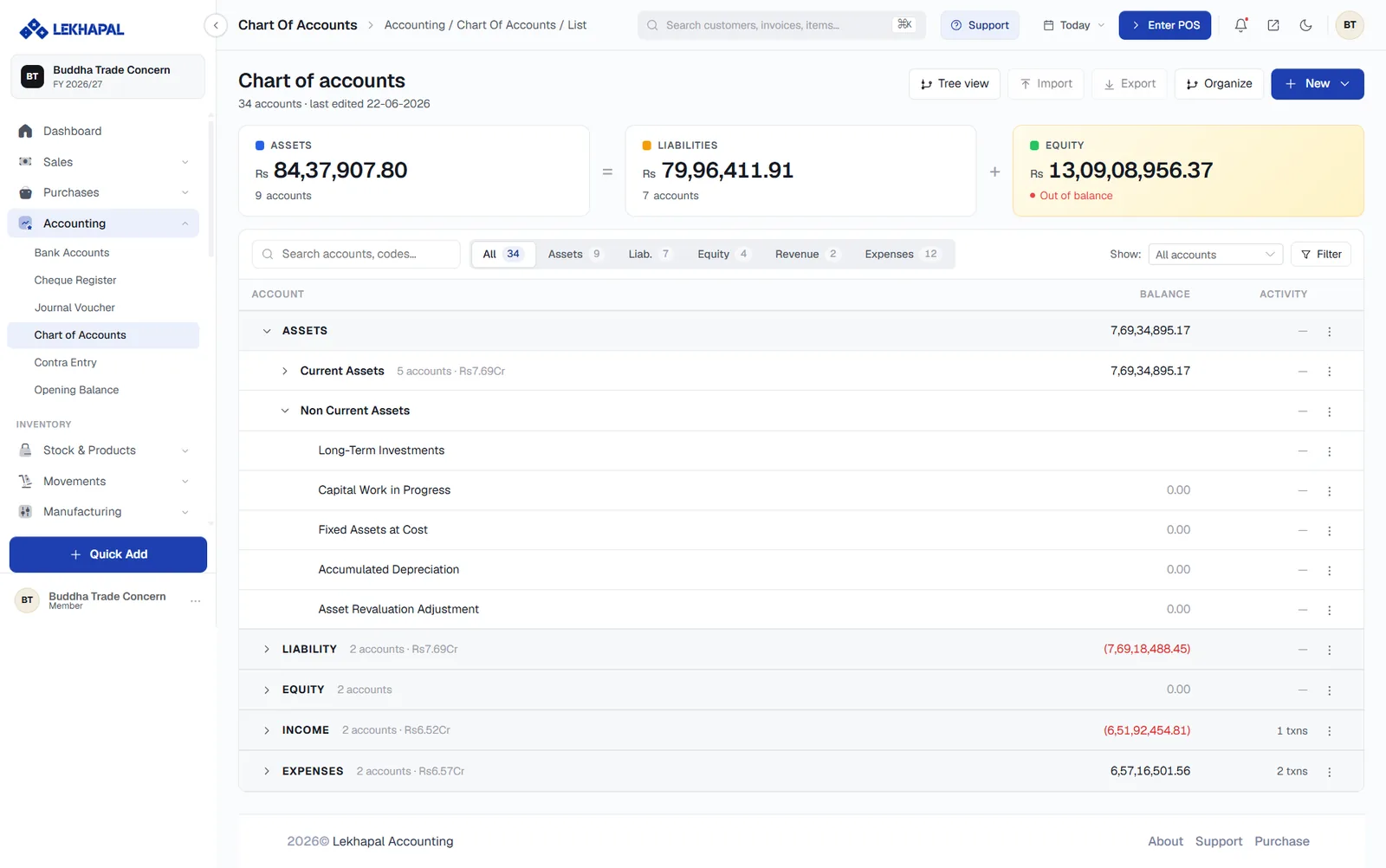
The accounting equation, at the top
Three cards show the totals for Assets, Liabilities and Equity, laid out as the equation itself:
Assets = Liabilities + Equity
If the equation does not hold, the Equity card is flagged Out of balance — a signal to check the Trial Balance and your opening balances.
Filters
Filter chips across the top split the list by type, with a count on each: All, Assets, Liab., Equity, Revenue, Expenses. Search by account name or code, and use Show and Filter to narrow further.
The tree
Accounts are nested. ASSETS contains Current Assets and Non Current Assets; Non Current Assets contains Long-Term Investments, Capital Work in Progress, Fixed Assets at Cost, Accumulated Depreciation and so on. Expand and collapse with the arrows.
Each row shows the account's Balance and its Activity — the number of transactions posted against it.
Header actions
| Action | What it does |
|---|---|
| Tree view | Switches between the nested and flat views |
| Import / Export | Bulk load or download the account list |
| Organize | Restructures the hierarchy |
| + New | Adds an account |
The five account types
| Type | Holds | Example |
|---|---|---|
| Asset | What the business owns | Cash, stock, fixed assets |
| Liability | What the business owes | Supplier payables, VAT payable, loans |
| Equity | The owner's stake | Share capital, retained earnings |
| Revenue | What the business earns | Sales of goods, sales of services |
| Expense | What the business spends | Rent, salaries, purchases |
Where accounts get used
When Lekhapal records a transaction, it picks the account for you:
| Transaction | Account type |
|---|---|
| Sales | Income |
| Rent | Expense |
| Cash | Asset |
| Loan | Liability |
You choose accounts directly in only two places: the line items of an expense, and the lines of a journal voucher.
Add accounts before you need them
It is much easier to add Delivery Charges as an expense account now than to reclassify six months of entries out of Miscellaneous later.